skip to main |
skip to sidebar
Sunday, December 28, 2014
Posted by
Corey Harrell
Christmas is in the rear view mirror and you may be left wondering about the gift you didn't find under the tree. The gift loaded with DFIR goodness to bring you into the new year. A gift you can use to improve your knowledge and skills. A gift to help you get to the next level in digital forensics, incident response, or malware analysis. You didn't get any DFIR goodness so it's a great opportunity to reward yourself with a gift of your own choice; one to accomplish what the previous sentences alluded to. If you fit this description then the book The Art of Memory Forensics is what you should be looking for. Even if the description doesn't fit and you don't already own this book then you should seriously check it out. This post is my review of the book The Art of Memory Forensics.
Three in One
The book addresses memory forensics on the following three operating systems: Windows, Linux, and Mac. This makes it an outstanding book since it addresses the most commonly faced operating systems. Furthermore, the content not only addresses memory forensic techniques but goes into detail about operating system internals. The majority of the systems I encounter are Windows systems so my focus was on the Windows portion of the book. (I did skim the other sections but I took my time in the Windows section.) The content went deep into the various Windows data structures and function calls. This makes the book an outstanding reference to better understand operating system internals. I easily envision myself using this book as a reference for years to come.
Not Just Words but Hands-on
One thing I tend to look for in a technical security book is how easy is it for the reader to take the content/techniques then apply it elsewhere. This is another area where the Art of Memory Forensics shines. The book's website provides additional materials that accompany the book. The items include lab questions, lab answers, and memory images for each chapter. This allows the reader an opportunity to do the hands-on labs to re-enforce that chapter's content. It's a great way to learn since you are actually performing memory forensics on an image after reading about it. Furthermore, to explain concepts the book uses - for the most part- memory images freely available on the Internet. As you read the book you can follow along by performing the same activities on the same memory images. At times the authors don't explicitly say what memory image they are using but the name of the memory images is pretty revealing. For example, in the Detecting Registry Persistence section (Kindle version page 4626) the Volatility handles plug-in is ran against a memory image named "laqma.mem". On the SampleMemoryImages webpage you can see a Laqma memory image is available and this is the one used in the book. This occurs frequently in the book as well as the authors specifically mentioning the memory image they are using.
The one area I thought that could make this book even better would be for the authors to explicitly state the memory image being used in the examples. This would make it easier for others (especially people who are not aware about the available memory images) to follow along in the book doing the same examples.
Memory Forensics in Toolbox
The last point I wanted to touch on about why I think so highly of this book is memory forensics is a process we need to have in our toolbox. This is true regardless if the work involves incident response or malware analysis. In incident response, there are times when you need to examine the volatile data on a system to obtain an answer. For example, a system is making network connections to a known malicious domain, which is setting off alerts. To tie the network connections to an actual process on the system requires memory forensics. The need for this in incident response is even more so with the recent increase of an exploit kit leveraging fileless malware. In malware analysis, there are times when memory forensics can provide additional information about a sample under examination. Does it open a socket, make network connections, inject code, hook functions, etc.. Memory forensics is now a process we need available in our toolbox and this book can help put it there.
All in All
If you are looking for a gift loaded with DFIR goodness, looking to improve your knowledge/skills, or looking for help to get to the next level in DFIR then this book is for you. The Art of Memory Forensics is a hefty book loaded with excellent content. It's an outstanding book and for those who don't already own it should seriously consider making it their next DFIR purchase. Just make sure to get your money's worth by grabbing the labs, memory images, and then putting hands to the keyboard as you read along.
Wednesday, July 30, 2014
Posted by
Corey Harrell
Helping train a computer security incident response team (CSIRT) comes with the territory when building out an enterprise incident response process. As I was reading No Starch's recently released Penetration Testing A Hands-On Introduction to Hacking book by Georgia Weldman I saw an opportunity. The book target's audience are beginners. In the author's words "I thought an introduction to pentesting would make the biggest impact on the audience I most wanted to reach." The opportunity I saw was the book can also be leveraged by people new to incident response. Specifically, new to responding to systems hit with either client-side or web application attacks. To see how a beginner pen testing book can become a beginner incident response book read on.
Practical Approach
No Starch Press has a series of books with the word "practical" in their title. These books are the equivalent of an entire training for the cost of a book. The reason is because they take a practical approach. They provide supplemental material which allows the reader to do the same hands-on activities they are reading about throughout the book. Not only does the reader learn through reading but they learn by doing using the same tools and data described in the books. The Penetration Testing book may not have "practical" in its title but it follows the same approach, which is why it is a great book for beginners.
The book starts out by having the reader configure four different virtual machines (VMs). One VM is a Kali box, which is the platform the reader launches attacks from. The three other VMs (Windows XP, Windows 7, and Ubuntu) are configured very vulnerable to make it easier to attack them. As the reader progresses through the book they read about performing various attacks followed by actually doing the attacks against the vulnerable VMs. It's an excellent approach to expose beginners to pen testing. On the flip side, it's also an excellent approach to expose beginners to incident response. Not only does the reader get familiar with different attacks, vulnerabilities, and the payloads but they are creating compromised vulnerable VMs to examine after the fact. So the reader can compromise a system then examine the system to see what attack artifacts are present.
The book does cover numerous vulnerabilities and exploits. However, were two attack categories I thought excel at helping incident response beginners. Over the years, attacks targeting client-side and web applications have been a significant issue for organizations. These attacks are so common that sooner or later they will be encountered by most incident responders. As a result, exploring these attacks is of utmost important for people new to the IR field and the book addresses these attacks thought-out different chapters. The reader may gain a thing or two from the other attacks (i.e. MS08-067 exploitation) but the exploits used in those attacks are something they may not see outside of training environments due to their age.
One Configuration Change for XP VM
One step to perform in addition to what is outlined in the Setting Up Your Virtual Lab chapter is to enable logging for Filezilla (FTP service) on the XP VM. To do so, access FileZill'a admin panel then select Edit -> Settings to get to the configuration window. In the logging section check the Enable Logging selection.
Where to Look
Before diving into the client-side or web application attacks I need to take a moment to outline where the reader needs to look for attack artifacts. I won't go into detail about all of the artifacts and will only cover the pertinent ones to explore the attacks for the Windows VMs.
Windows XP
One of the vulnerable applications installed on Windows XP is XAMPP. XAMPP is an "Apache distribution containing MySQL, PHP and Perl; this provides the VM with vulnerable web services. The following are the logs and artifacts of interest the reader would want to review after the attacks:
Apache logs location: C:\xampp\apache\logs
FileZilla log location: C:\xampp\FileZillaFTP\Logs
The Windows XP operating system artifacts of interest are:
NTFS Master File Table ($MFT)
NTFS Logfile ($Logfile)
Internet explorer browser artifacts
Windows 7
One of the applications installed on the Windows 7 VM is the web service IIS. The book provides a vulnerable web application (called BookApp) that runs on top of IIS. The ISS logging settings can be left in their default configuration. The following are the logs and artifacts of interest the reader would want to review after the attacks:
IIS logs location: C:\inetpub\logs\LogFiles\W3SVC1
Windows HTTP.sys error logging location: C:\Windows\System32\LogFiles\HTTPERR
The Windows 7 operating system artifacts of interest are:
NTFS Master File Table ($MFT)
NTFS Logfile ($Logfile)
NTFS Change Journal ($USNJrnl)
Stay Organized
The last tidbit I'll cover before diving into the attacks is the need to stay organized. As I worked my way through the book I took notes to record when and what attack I performed against what vulnerable VM. This reference made things easier as I was examining the artifacts; it was easier to match up attacks against activity in the artifacts. The screenshot below shows a portion of the notes I kept
Keeping notes is not a necessity but something I highly recommend for beginners.
Client side attacks
Artifacts left by client-side attacks have been well documented on this blog. To name a few: Java was documented here and here, Silverlight discussed here and here while Adobe Reader was mentioned here. Even though some artifacts have already been documented replicating client-side attacks is more beneficial than only reading research done by others. Actually performing the attack against a vulnerable VM shows a completely different perspective and one that can't be attained by just reading about artifacts. The image below shows the Windows XP parsed MFT around the time the system was compromised with the Aurora Internet Explorer exploit (the exploit is the htm page.)
Web Application attacks
The book covers numerous attacks against web applications on the Windows XP, Windows 7, and Ubuntu VMs. The variety of the attacks I thought provided a good starting point for exploring the different ways web servers and applications are compromised. In this post I'm only discussing a few items to demonstrate the traces left in certain artifacts showing these attacks took place.
Vulnerability and Nmap Script Scan Against Windows 7
Chapter 6 walks through a process for finding vulnerabilities on a VM. The chapter has the reader use the following methods: Nessus (vulnerability scanner), Nmap scripting engine (port scanner), Metasploit (exploitation framework), Nikto (web application scanner), and one manual technique. Exploring this aspect for incident response is important since for a system to be compromised a vulnerability had to be exploited. Seeing the traces left by the different methods provides an idea about what one may come across during examinations.
The image below shows the Nessus vulnerability scan activity in the Windows 7 IIS logs. The image is only a small portion of the logs but it illustrates how noisy vulnerability scanners are. This is obvious activity that most monitoring tools will detect fairly quickly. It's also activity that will most likely be tied to people authorized to perform this work for an organization and not an attacker.
In addition to the IIS logs in the W3SVC1 folder, the HTTP.sys error logging provides additional clues about the vulnerability scanning activity as shown below.
The Nmap script scan activity leaves traces in the logs as well but nothing close to the amount left by a vulnerability scanner. The image below shows the Windows 7 IIS logs where the Nmap script scan activity was located (note: the activity will be dependent on the script ran and won't always appear as it does in the image.)
Command Execution Vulnerability Against Windows 7 IIS
Part III in the book has eight different chapters focused on different types of attacks. I won't rehash what all of the attacks are since the book's table of contents is adequate enough. One of the attacks was against a command execution vulnerability, which allows a person to execute commands against the system through the web application. In order to see the command's output - since the web application doesn't display - it requires the attacker (aka reader) to redirect it to a file on the server and then the file is accessed.
The image below shows the command being executed though the "subscribe to a newsletter" functionality (line in the middle.) It's not too apparent what is taking place since the HTTP method used is a POST to send data to the server. The data is not reflected in the URL. However, shortly after the POST there is a GET request for a file on the server named test.txt and the 200 status code means OK (file is there). The POST method may not be too revealing but the GET method reveals a file is on the server.
The server's MFT (parsed into a timeline) provides more clarity about the attack as shown below. The ipconfig.exe program executed at the same time as a new user (georgia) subscribed to a newsletter. Looking at the contents of test.txt shows it contains the ipconfig command output.
PHPAdmin SQL Command Against Windows XP
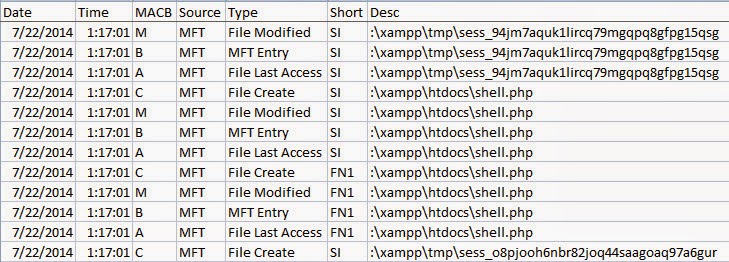
Another attack that was discussed is leveraging the PHPAdmin panel to execute SQL commands directly against a backend database. The attack involved executing a SQL command that creates a simple web shell on the system; shell only lets you execute commands in a supplied URL.
The Apache logs reveal the attack as seen in the image below. The line for the GET request at 21:17:01 (EDT) shows the URL containing the exact SQL command that creates the file called shell.php. The other highlighted lines show a request for the shell.php file followed by the various commands that were executed through the shell.
The server's MFT parsed into a timeline provides more clarity about the attack as shown below (time is in UTC).
Conclusion
As described in the book's introduction it is for beginners. Those who are new to pen testing field. I also see value in the book for incident response. For those who are either new to incident response without a background in offensive security or those who haven't been exposed to compromised web servers and applications. One shouldn't expect to know everything about investigating systems impacted by client-side and web attacks after working their way through the book. Heck, the reader may never see these exact attacks (outside of pen testers) against production systems. However, the reader will have a better understanding about attack vectors. The means by which an attacker can gain access to a system in order to deliver a payload or malicious outcome. The reader will have an even better understanding about the attack vector artifacts left on those systems. For anyone fitting what I just described should definitely pick up this book, build the VMs, attack the VMs, and then discover what traces they can find. It won't be the last step in their journey but it will be a good first one.
Sunday, June 15, 2014
Posted by
Corey Harrell
About a month ago I finished reading Windows Forensic Analysis 4th Edition by Harlan Carvey. Due to personal obligations I was unable to post my WFA 4/e review until now. All in all the 4th edition is good update to the Windows Forensic Analysis series.
It's an Update and Not a Companion Book
I think it is necessary to first address the expectations for WFA 4/e. In my Review of Windows Forensic Analysis 3rd Edition I mentioned " at first I was worried about reading the same information I read in Windows Forensic Analysis 2nd Edition or Windows Registry Forensics but my worries were unfounded. The author has said numerous times WFA 3/e is not a rewrite to his other books and is a companion book." In the WFA series, Syngress has kept the same title and just increased the edition number. In a way, this can have an impact on people's expectations. WFA third edition was a complete rewrite of the second edition. This meant the books were complimentary and the third edition didn't contain any of the previous material from the second. I can see how this can create an expectation that with each new edition it will follow the same path. However, this is not how newer editions are typically done since they usually contain updated material and are not complete rewrites. With WFA 4/e the book is not a complete rewrite but it does contain some great updated content. This review is focused on the updated content since I already discussed some of the material in my WFA 3/e review.
Don’t Overlook the Materials Accompanying the Book
There are very few DFIR authors who not only produce content outlining processes and artifacts but also create and release the necessary tools to carry out the process they described. Most of the DFIR authors I've read (including training content authors) usually point people to tools created by others. They don't provide tools of their own or source code to help you better understand how artifacts are parsed. When reviewing a DFIR book it's necessary to take into consideration the book as a whole including the materials provided with it. This is one area where I think Harlan excels and it's something I always liked about his work. The material for his books contain a wealth of resources from cheat sheets to open source tools to explanations about how to do something.
Along with WFA 4/e Harlan provided new and updated material to accompany the book. One of the more notable mentions are the new plug-ins for RegRipper (link to most recent version at time of this post). Seriously, there are so many updates that you'll really need to read the updates.txt file he provides. Some plug-ins were updated to support Wow6432Node, others had alerts added, and there are a bunch of new plug-ins. Besides RegRipper there are tools (and source code) to parse the RecentFileCache.bcf, index.dat, and $UsnJrnl to name a few.
It's not always about the tools either. In the Chapter 5 folder there is a file called usbdev.pdf. This document outlines the Windows 7 USB device analysis including what RegRipper plug-ins pull what, how various registry values tie together, and other information to perform this analysis. The Chapter 9 folder contains even more documents related to report writing. Hands down, the material provided with the book is outstanding.
Tying Things Together
One of the updates to this edition are two new chapters that tie things together. First is Chapter 8 Correlating Artifacts while the second is Chapter 9 Reporting. To be successful in DFIR one needs to be able to tie information together from different sources to answer the questions presented to them. This is why I really like these updated chapters. Throughout the book Harlan discusses the significance of various Windows artifacts and clearly explains how those artifacts can help a case. However, the artifacts are discussed individually to make it easier to understand. The Correlating Artifacts chapter is where things are tied together. Various artifacts are brought together to illustrate how the information they contain can help address certain questions. The sample questions addressed are ones commonly encountered on various types of cases such as: correlating Windows shortcuts to USB devices, detecting system time changes, and determining data exfiltration. Again, the ability to take the information contained from different artifacts to make sense of it is really what we do in DFIR. The information was laid out in a clear manner and followed up with how to communicate your findings in reporting.
Overall Thoughts
As I said before, all in all the 4th edition is good update to the Windows Forensic Analysis series. There are updates throughout the book including some Windows 8 artifacts and on the back end it's completely new content. The book materials are loaded with new goodies. Personally, I tend to shy away from purchasing updated editions that contain the same material as the previous edition with updates. However, I took a chance with WFA 4/e (based on who the author is) and I wasn't disappointed with my purchase.
Wednesday, July 4, 2012
Posted by
Corey Harrell
A penetration test is a method to locate weaknesses in an organization’s network by simulating how an attacker may circumvent the security controls. The Preface indicated Metasploit The Penetration Tester’s Guide was written specifically so “readers can become competent penetration testers”. The book further goes on to describe a penetration tester as someone who is able to find ways in which a “hacker might be able to compromise an organization’s security and damage the organization as a whole”. I’ve occasionally seen people talk about the book favorably but their comments were as it related to penetration testing. I wanted to review Metasploit The Penetration Tester’s Guide from a different angle; from the Digital Forensic and Incident Response (DFIR) perspective. As a DFIR professional it is important to not only understand the latest attack techniques but it’s equally important to be aware of what artifacts are left by those techniques. This is the perspective I used when reviewing the book and I walked away thinking. If you want to bring your Digital Forensic and Incident Response skills to the next level then throw Metasploit in your toolbox and work your way through this book.
From Methodology to Basics to Exploitation
The book starts out discussing the various phases to a penetration test which were: pre-engagement interactions, intelligence gathering, threat modeling, exploitation, and post exploitation. After covering the methodology there was an entire chapter dedicated to Metasploit basics. I liked how the basics were covered before diving into the different ways to perform intelligence gathering with the Metasplot framework. Not only did the intelligence gathering cover running scans using the Metasploit built-in scanners but it also discussed running scans with nmap and then building a database with Metasploit to store the nmap scans. Before getting into exploitation an entire chapter was dedicated to using vulnerability scanners (Nessus and Nexpose) to identify vulnerabilities in systems. After Chapter 4 the remainder of the book addresses exploitation and post-exploitation techniques. I liked how the book discussed simpler attacks before leading up to more advanced attacks such as client-side, spear phishing, web, and SQL injection attacks. The book even talked about some advanced topics such as building your own Metasploit module and creating your own exploits. I think the book fulfilled the reason for which it was designed: to “teach you everything from the fundamentals of the Framework to advanced techniques in exploitation”.
Prepare, Prepare, and Prepare
Appendix A in the book walks you through setting up some target machines. One of which is a vulnerable Windows XP box running a web server, SQL server, and a vulnerable web application. Setting up the target machines means you can try out the attacks as you work your way through the book. I found it a better learning experience to try things out as I read about them. One addition benefit to this is that it provides you with a system to analyze. You can attack the system then examine afterwards to see what artifacts were left behind. I think this is a great way to prepare and improve your skills to investigate different kinds of compromises. Start out with simple attacks before proceeding to the more advanced attacks.
This is where I think this book along with Metasploit can bring your skills to the next level. There are numerous articles about how certain organizations were compromised but the articles never mention what artifacts were found indicating how the compromise occurred. Does the following story sound familiar? Media reports said a certain organization was compromised due to a targeted email that contained a malicious attachment. The reports never mentioned what incident responders should keep an eye out for nor does it provide anything about how to spot this attack vector on a system. To fill in these gaps we can simulate the attack against a system to see for ourselves how the attack looks from a digital forensic perspective. Spear-phishing attack vector is covered on page 137 and the steps to conduct the attack is very similar to how those organizations are compromised. The simulated attacks don’t have to stop at spear phishing either since the following could also be done: Java social engineering (page 142), client-side web exploits also known as drive-bys (page 146), web jacking (page 151), multipronged attack (page 153), or pivoting onto other machines (page 89) are a few possibilities one could simulate against the targeted machines. It's better to prepare ourselves to see these attacks in advanced then it is to wait until we are tasked with analyzing a compromised system.
Where’s the Vulnerability Research
Metasploit The Penetration Tester’s Guide is an outstanding book and is a great resource for anyone wanting to better understand how attacks work. However, there was one thing I felt the book was missing. The process to identify and research what vulnerabilities are present in specific software you want to exploit. The book mentions how Metasploit exploits can be located by keyword searches but it doesn’t go into detail about how to leverage online resources to help figure out what exploits to use. A search can be done online for a program/service name and version to list all discovered vulnerabilities in that program. Also, there is additional information explaining what a successful exploit may result in such as remote code execution or a denial of service. This approach has helped me when picking what vulnerabilities to go after and I thought a book trying to make competent penetration testers would have at least mentioned it.
Four Star Review
If someone wants to know how to better secure a system then they need to understand how the system can be attacked. If someone wants to know how to investigate a compromised system then they need to understand how attacks work and what those attacks look like on a system. As DFIR professionals it is extremely important for us to be knowledgeable about different attacks and what artifacts those attacks leave behind. This way when we are looking at a system or network it’s easier to see what caused the compromise; a spear phish, drive-by, SQL injection, or some other attack vector. I think the following should be a standard activity for anyone wanting to investigate compromises. Pick up Metasploit The Penetration Tester’s Guide, add Metasploit to your toolbox, and work your way through the material getting shells on test systems. You will not only have a solid understanding about how attacks work but you will pick up some pen testing skills along the way. Overall I gave Metasploit The Penetration Tester’s Guide a four star review (4 out of 5).
Thursday, May 3, 2012
Posted by
Corey Harrell
There are times when I come across malware on systems. It happens when I’m helping someone with computer troubles to processing a DFIR case to providing assistance on a security incident. It seems as if malware is frequently lurking beneath the surface. Occasionally I thought it might be helpful to know not only what the malware on those systems was up to but also what the malware was incapable of doing. Practical Malware Analysis breaks down the art of analyzing malware so you can better understand how it works and what its capabilities are. PMA is an excellent book and I highly recommend it for the following reasons: understanding malware better, training, and extending test capabilities.
Understanding Malware Better
A very telling quote from the book’s opening is “when analyzing suspected malware, your goal will typically be to determine exactly what a particular suspect binary can do, how to detect it on your network, and how to measure and contain its damage”. Practical Malware Analysis outlines how to meet that goal by outlining a process to follow and the tools to use. Part 1 covers basic analysis demonstrating how to better understand a program’s functionality by using basic static and dynamic analysis. Part 2 builds on the basic analysis by diving deeper into static analysis by analyzing the malware’s assembly code. Part 3 continues by discussing an advanced dynamic analysis technique which was debugging. The book is written in a way where it is fairly easy to follow along and understand the content about the analysis techniques. The later sections in the book: Part 4 Malware Functionality, Part 5 Anti-Reverse-Engineering, and Part 6 Special Topics provided a wealth of information about malware and what someone may encounter during their analysis.
I don’t foresee myself becoming a malware reverse engineer. This wasn’t what I had in mind when I started reading PMA. My intentions were to learn the techniques in PMA so I could be better at my DFIR job. To quickly get intelligence when I’m examining an infected system to help explain what occurred. To be able to rule out malware located on systems from being accused of the reason why certain actions happened on a system. PMA went beyond my expectations and I can honestly say I’m better at my job because I read it.
Training
Practical Malware Analysis follows the No Starch publishing practical approach which is to reinforce content by providing data the reader can analyze as they follow along. The book provides a wealth of information about analyzing malware then follows it up with about 57 labs. The authors indicated they wrote custom programs for the book and this means there are a lot of samples to practice the malware analysis techniques on. The labs are designed so the reader has to answer specific questions by analyzing a sample and afterwards the solutions can be referenced to see the answers. A cool thing about the solutions is that there are short and long versions. The short versions only provide the answers while the long version walks the reader through the analysis demonstrating how the answers were obtained. The combination of the content, labs, samples, and solutions makes PMA a great self training resource.
PMA contains so much information it’s one of those books where people can keep going back to review specific chapters. I can see myself going back over numerous chapters and redoing the labs as a way to train myself on malware analysis techniques. PMA is not only a great reference to have available when faced with malware but it’s even a greater training resource to have regular access to.
Extending Test Capabilities
The process and techniques described in PMA can be used for other analysis besides understanding malware. A friend of mine who was also reading the book (when I was working my way through it) had to take a look at a program someone in his organization was considering using. Part of his research into the program was to treat it like malware and he used out some of the techniques described in PMA. It was very enlighten the information he learned about the program by incorporating malware analysis techniques into his software testing process. I borrowed his idea and started using some PMA techniques as part of my process when evaluating software or software components. I already used it on one project and it helped us identify the networking information we were looking for. The process and tools discussed in the book helped my friend and myself extend our software testing capabilities so it stands to reason it could do the same for others.
Five Star Review
PMA is another book that should be within reaching distance in anyone’s DFIR shop. I went ahead and purchased PMA hoping the book would improve my knowledge and skills when faced with malware. What I ended up with was knowledge, a process and tools I can use to analyze any program I encounter. PMA gets a five star review (5 out of 5).
One area I thought could be improved with PMA was providing more real life examples. It would have been helpful if the authors shared more of their real life experiences about analyzing malware or how the information obtained from malware analysis helped when responding to an incident. I think sharing past experiences is a great way to provide more context since it lets people see how someone else approached something.
Sunday, February 26, 2012
Posted by
Corey Harrell
Last week I finished reading Windows Forensic Analysis 3rd Edition by Harlan Carvey. I think WFA 3/e will be a welcomed addition to anyone’s Digital Forensic and Incident Response (DFIR) library. The book has a lot to offer but the content about Windows 7 and processes is why I’m glad it’s in my library.
All about Windows 7
When thinking about references we have available when performing digital forensic examinations on a Windows 7 system there aren’t a lot that come to mind. We have some great presentation slides (cough cough Troy Larson cough), a few blog posts, and the paper SWDGE Technical Notes on Microsoft Windows 7. However, there isn’t a DFIR book who’s main focus is about Windows 7 until now. WFA 3/e comes out of the gates talking about Windows 7 in Chapter 3. The chapter goes into great detail about volume shadow copies (VSCs). What VSCs are, how to access VSCs, different methods to examine VSCs, and different tools available to use against VSCs. The Windows 7 theme continued into Chapter 4 File Analysis with topics such as event logs and jumplists (a new artifact showing user activity). Rounding out the forensic nuggets about Windows 7 was Chapter 5 Registry Analysis. At first I was worried about reading the same information I read in Windows Forensic Analysis 2nd Edition or Windows Registry Forensics but my worries were unfounded. The author has said numerous times WFA 3/e is not a rewrite to his other books and is a companion book. The registry analysis chapter showed how true the statement is because it focused on what information can be pulled from Windows 7 registry hives. The author also highlighted the differences between Windows 7 and previous Windows operating systems. If anyone is going to be encountering Windows 7 systems then WFA 3/e will be one of the references to have within reaching distance.
Process, Process, Process
WFA 3/e discusses numerous Windows artifacts and different tools capable of parsing those artifacts. The book also provides context about the artifacts and tools by discussing the DFIR processes behind them. Right off the bat the author lays the foundation by discussing Analysis Concepts in Chapter 1. There is even a section about tools versus processes. A quote I liked was “analysts can find themselves focusing on specific tool or application rather than the overall process”. I see a lot of DFIR discussions focus on tools instead of the overall process on how those tools could be used. I even fell into this trap earlier in my career. Whenever I read a DFIR book or any analysis book for that matter I want to see the author explain the overall process because it makes it easier for me to translate the information over to my work. WFA 3/e did an outstanding job discussing processes which can be seen in various chapters. The two chapters I wanted to mention specifically are 6 and 7.
Chapter 6 Malware Detection was dedicated to how the author goes about to finding malware on a system. The author lays out the overall process he follows (a checklist accompanies the book) and then goes into detail about what he is looking for and what tools he uses to carry out the process. The same approach is used in Chapter 7 Timeline Analysis. The author discusses his process for performing timeline analysis including: how he approaches timelines, how he builds timelines, and how he examines timelines.
It’s nice to see the processes someone else uses and the case experiences shared by the author helped reinforced why the process is important. WFA 3/e doesn’t disappoint because the author not only provides tools to do DFIR work but he lays out a process that others can follow.
Don’t Overlook the Materials Accompanying the Book
The author made the supporting material to WFA 3/e available online (on this Google page) and this is a welcomed feature for those of us who bought the book’s electronic version. Similar to the author’s previous books I already mentioned, the materials accompanying his book are full of DFIR goodies such as ….
* jumplist parser (jl.pl): the author wrote a script to parse jumplists. This is the only command-line tool I know of that can parse jumplists. I tested script against jumplists inside VSCs and the results were impressive.
* Malware detection capability: there are different scripts to help with detecting malware including mbr.pl to find mbr infections and wfpchk.pl to check the contents of the dllcache.
* Checklists: there are a few different checklists that may be useful references during an examine.
* Source code: the source code is provided to all the scripts. I’m teaching myself Perl so being able to read the code helps me get a better understanding about not only knowing how the script works but how the author puts scripts together.
Clarification about ShadowExplorer
There were no significant improvements I could suggest to make WFA 3/e better. I could make a couple minor suggestions but there isn’t anything glaring. However, there was something I wanted to clarify. Chapter 3 Volume Shadow Copies Analysis mentions using ShadowExplorer to access and browse VSCs. The author mentioned that ShadowExplorer will only show the VSCs available within the volume or drive on which the program is installed on. That ShadowExplorer has to be reinstalled on the drive in order to view its VSCs. The section I’m referring to is on Kindle page 1,366. I might have misunderstood this statement and if I did then please ignore this section to my book review.
ShadowExplorer only needs to be installed on your forensic workstation and it can be used to view any volume’s VSCs mounted to the workstation. The drop down menu next to the drive letter lets you select any drive letter on the workstation to view that volume’s VSCs. I’ve used ShadowExplorer in this manner to view VSCs for drives connected to my system through USB docks and to view the VSCs inside a mounted forensic image. It's a nice way to preview VSCs.
Overall Five Star Review
Overall I give WFA 3/e a five star review (Amazon rating from 0 to 5 stars). The book has a lot to offer from Windows 7 artifacts to DFIR processes to better understanding the artifacts we encounter. As I said in the beginning to the post, the book is a welcomed addition to anyone’s DFIR library and it’s a great companion book to the author’s other books about digital forensics on Windows systems.
I wanted to say how humbling it was to see the author mention my blog. Before I became more active online I lurked in the shadows following a lot of people in the DFIR community. Harlan is one of those people. Every time I see someone mention me I am still taken back. I wanted to say thank you Harlan for the recognition and including an earlier version to my Regripper VSC batch script in your materials. (an updated version to the script can be found here).
Monday, October 24, 2011
Posted by
Corey Harrell
I find myself in more situations where I’m not completely satisfied with my DFIR tools. They either don’t parse certain information or lack capabilities I want. Batch scripting helped in some situations but the scripts are limited in what I can do. For example, it’s difficult (if not impossible) to create a script to extract information from an artifact that’s not supported by existing tools. Learning a programming language has been at the top of my to-do list for some time due to these reasons. I was browsing my local book store when I came across the book Perl Programming for the Absolute Beginner.
Why Perl Programming for the Absolute Beginner
I chose the book after I skimmed through a few other Perl programming books. Perl Programming for the Absolute Beginner is written for an audience without previous programming experience. The book goes into great detail explaining basic programming concepts such as variables, arrays, loops, and subroutines. I took a C++ course in my undergraduate about seven years ago and the only thing I remember is that I took a C++ course. Basically, I have zero programming knowledge including not knowing much about programming concepts. A lot of the books I skimmed, such as Learning Perl, don’t take the time to explain the basic concepts since they expect the reader to be already familiar with them. I wanted a book to explain the basics in addition to the language; Perl Programming for the Absolute Beginner fit the bill.
Numerous books I looked at use exercises at the end of each chapter to reinforce the material covered. The exercises are pretty simple and perform one action such as a math calculation. Perl Programming for the Absolute Beginner takes a different approach in teaching Perl. Instead of individual exercises the book has the reader write computer games which are fully functioning programs. I thought this approach does a better job showing how to use Perl since it covers the planning, organizing, coding, and testing activities involved with script development. Plus the approach was entertaining and it kept my interest. I’d rather write a “Fortune Teller Game” than a script to compute “the circumference of a circle”. ‘nuff said.
What I learned
My review is going to be a little different. I’m neither discussing the book’s contents (if you want to know then read the table of contents) nor how helpful the book could be. Instead I’m talking about what I learned from the book and how it has impacted my DFIR work so far.
Seeing Behind the Curtain
Bear with me for this analogy… When I was younger I used to love watching Kung-fu. At times I watched movies completely in another language without subtitles. I got the gist of what was going on by watching body language, facial expressions, tones of people’s voices, and the bad guys getting stomped. However, when I watched the same movie in English (subtitles or dubbed over) I realized how much I missed about the movie’s plot. Learning Perl is the equivalent of adding subtitles or dubbed English to a Kung-fu movie. Before I understood the gist of what my Perl tools were doing but it’s completely different when you can read and actually understand the code to see how it produces its output. It let me see behind the tool abstraction curtain.
Extending my Capability
I was considering between learning Perl or Python since programs in my toolbox are written in those languages. One of my goals is to learn a language that lets me customize tools to better meet my needs. I picked Perl because two tools I extensively use are written in Perl and plug-in based. Plug-ins allow the tool to be extended fairly easily and I felt knowing how to write them would have a greater impact on my DFIR work. My immediate need was for a Regripper plug-in to parse the UserInfo registry key in an NTUSER.DAT hive (I could have asked others for this but I wanted to learn how to do it). In the past I manually examined the UserInfo key in the NTUSER.DAT hive and if present the hives in system restore points or volume shadow copies. Performing the task was time consuming but I needed to know the information. Perl Programming for the Absolute Beginner taught me enough about Perl to make it pretty easy to write a plug-in once I re-read the creating plug-ins section in Windows Registry Forensics. Taking the time to put the userinfo plug-in together will make things easier and faster for me in the future since I can now extract the information from a system in seconds. Talk about improving efficiency.
Breaking my Handcuffs
I’m still wearing handcuffs since I’m still dependent on existing tools and scripts created by others. However, Perl Programming for the Absolute Beginner opened my eyes to a future where if I encounter an artifact not supported by my tools then I could just write my own. A future where I no longer have to be satisfied and accept tools’ outputs when I want to see data differently. A future where repetitive tasks can be automated enabling me to spend more time on analyzing information. The book opened my eyes to a world where I don’t have to be handcuffed to my DFIR tools and the capabilities they provide. Perl Programming for the Absolute Beginner did not make me into a tool developer but it provided me with a foundation to build upon.
Four Star Review
Not all is rosy with the book though. I normally can overlook typos but I’m not very forgiven when there are typos in the code the reader is suppose to copy. It’s bad enough that beginners are going to mess something up and spend time tracking down their own mistakes. There’s no need to add even more typos resulting in people questioning themselves wondering what else they did wrong. Chapter Four’s Star Wars Quiz declares a variable named $valid but the rest of the program uses the variable $isvalid (on page 129). That small typo makes the game not work until the variable $valid is changed to $isvalid. As a reader I shouldn’t be required to find typos in code in order to make things work. I spend enough time finding my own mistakes as it is.
Overall I give Perl Programming for the Absolute Beginner a four star review (based on Amazon’s rating scheme). I highly recommend the book for anyone looking to learn the Perl programming language in addition to basic programming concepts. The book teaches the basics in an entertaining way enabling anyone to write simple scripts to solve issues. For those with programming backgrounds then I suggest looking elsewhere for a book on Perl since this is too basic. Learning Perl is a decent candidate because the target audience is for people familiar with programming concepts (I moved on to this book after reading Perl Programming for the Absolute Beginner).
Monday, June 27, 2011
Posted by
Corey Harrell
I became involved in the digital forensics (DF) field when I had to establish and manage a DF process to support financial investigations and fraud audits. When I got to the point of identifying tools I first looked to see what resources I had at my disposal. Lo and behold my security lab had a dongle to a commercial forensic product. In the beginning I exclusively used a few commercial products to perform forensics but over time I added additional tools to my arsenal to expand my capability. I’m bringing up my background since the intended audience for Digital Forensics with Open Source Tools (DFwOST) is new forensic practitioners and experienced DF practitioners new to open source tools. My review of DFwOST is coming from the perspective of an experienced DF practitioner who may rely on a few (or single) commercial tools during examinations.
Before diving into the world of open source tools DFwOST starts out by defining digital forensics and explaining the goals of any examination which is for an examiner to locate artifacts to indicate if a hypothesis is true or false. DFwOST then covers the three different analysis types used during an examination and the analysis types are: system, application, and file. DFwOST explains how to perform the different analysis by explaining the data, the potential artifacts of interest located in the data, and discussing the open source tools to use against the data. The system analysis covers partitioning and disk layouts of physical storage devices. In addition to this, DFwOST discusses the different file types and artifacts specific to the Windows Linux, and Mac operating systems. The application analysis explains the artifacts associated with different web browsers and mail applications. Rounding out the discussion, the file analysis covers the activities for examining the content of individual files and their metadata. The authors provided a listing of references at the end of each chapter that the reader can use to learn more about the topics DFwOST doesn't go into great detail on.
I think DFwOST will be beneficial to anyone who reads it whether if they are new to the field or an experienced practitioner. However, I think the book is a great resource to experienced DF practitioners who are not familiar with open source and free digital forensic tools. My reasoning is because DFwOST can help to expand capabilities in DF examinations, understand how commercial tools work, and identify additional tools.
Expand Capabilities in DF Examinations
Every tool has its strengths and weaknesses, and commercial tools are no different. There is not a single commercial product that has the ability examine every possible type of data or artifact encountered during exams. This issue is one of the reasons why DF practitioners have multiple tools at their disposal. How does DFwOST fit into the picture?
First DFwOST discusses tools and techniques that have a capability not present in the current crop of commercial tools. The additional capability provided by open source tools can be used to compliment the functionality of commercial tools. For example, chapter 9 discusses the timeline analysis technique and mentions a few tools to create timelines that include the metadata from the file system and various artifacts. In my experiences, timeline analysis is a powerful technique and it has helped me on a range of different examinations from financial investigations to human resource policy violation investigations to security incidents. The ability to generate timelines would be lost by solely relying on a single or few commercial products.
Understand How Commercial Tools Work
Some commercial tools automatically extract information from data and this functionality can help reduce the time needed to complete an examination. On the downside, automation provides a layer of abstraction that may result in examiners not completely understanding the data they are seeing or how the tool works. The tools (open source and free ones in Appendix A) highlighted in DFwOST can be a great educational benefit to examiners by helping better understand the data and how their commercial tools work; thus removing the layer of abstraction caused by automation. Open source tools can not only be ran against data to see how the output is different but the tools' various options can be tested and the code can be read to better understand how the tool functions. The educational benefit provided by open source tools will be helpful to any examination even if the tools are not actually used on a case.
Identify Additional Tools
DFwOST points out numerous tools to use during a digital forensic examination. Using additional tools can provide flexibility and additional resources for validation testing. At times there could be a need to only conduct a few activities and using a multipurpose commercial tool may be overkill for the task at hand. Additional time will be needed for a multipurpose tool since it takes time to load and configure the tool even if the task at hand is just to extract specific information from data. The tools in DFwOST provide this kind of flexibility.
In addition to flexibility, open source tools can be used in the validation testing of commercial tools. Does XYZ commercial software extract the information from a certain type of data properly? Does XYZ commercial tool work as advertised? Both questions can be quickly verified by reproducing the results with the open source tools discussed in DFwOST.
Five Star Review
Overall DFwOST will be a welcome addition to anyone’s DFIR library. The one topic I thought was missing from the book (or I overlooked) is mentioning the process or methods to validate digital forensic tools before they are used during an examination. I don't think the authors had to go into great detail on the subject but pointing the reader (especially people new to the field) to a few references could be helpful. Despite this, if I was posting my review on Amazon then DWwOST would get another five star rating.




 Posts
Posts

